
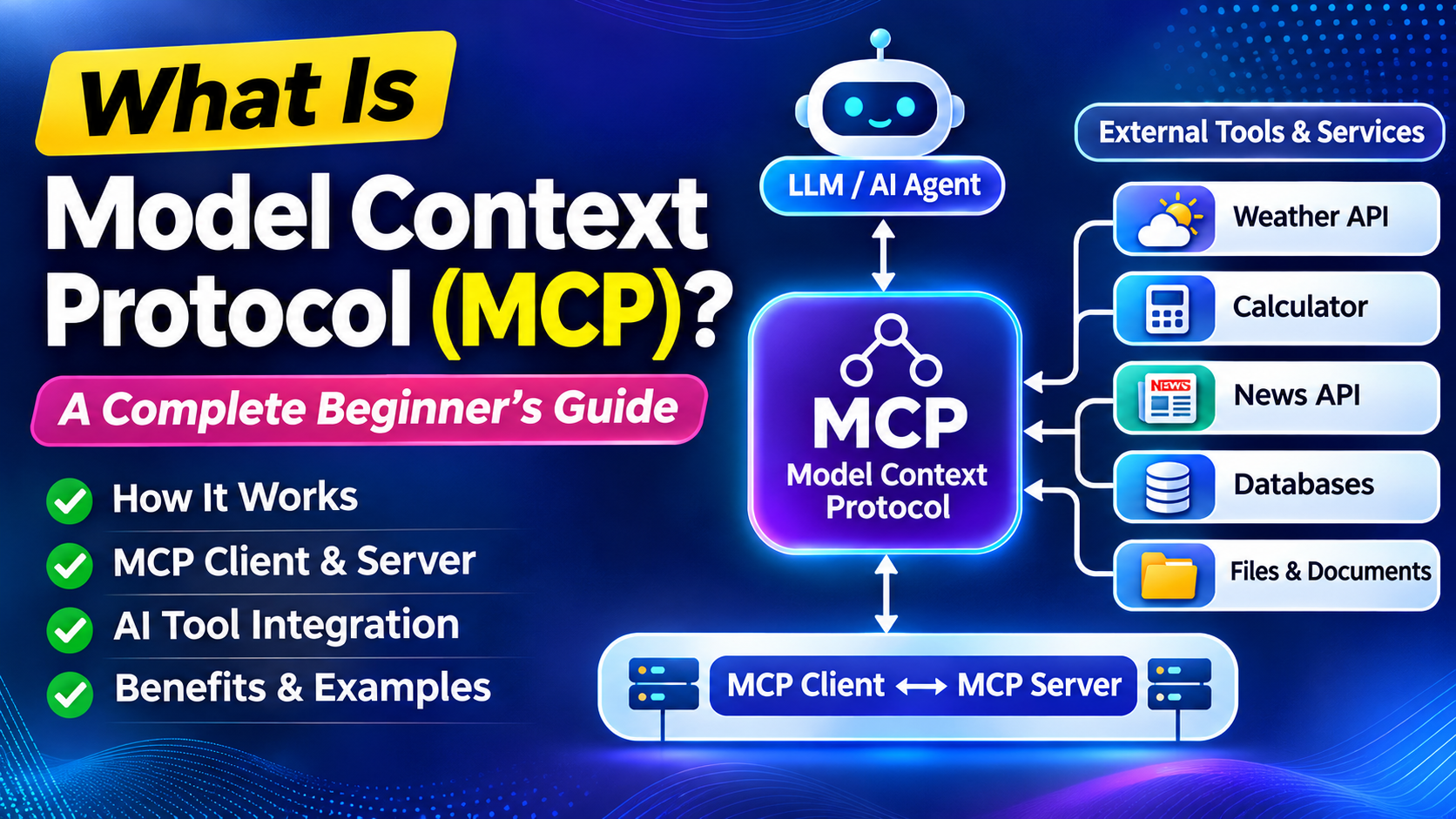
Artificial Intelligence is becoming more capable every day. Large Language Models (LLMs) can write articles, answer questions, generate code, summarize documents, and communicate in a natural conversational style. However, even the most advanced AI models have limitations.
For example, what happens when you ask an AI assistant:
- What is the current weather in Lucknow?
- What time is it right now?
- What are today’s latest news headlines?
- What is the result of a complex calculation?
- Can you access information from my business database?
An LLM cannot always answer these questions using its internal knowledge alone. It may need access to external tools, APIs, databases, or services.
This is where the Model Context Protocol (MCP) becomes important.
Model Context Protocol, commonly known as MCP, provides a standardized way for AI applications to connect with external tools and services. It helps AI assistants and AI agents discover available capabilities, select the right tool, execute it, and use the returned information to generate a useful response.
In this article, we will understand what Model Context Protocol is, why MCP is needed, how MCP architecture works, and the role of MCP clients and MCP servers. We will also use simple real-world examples to make the concept easy to understand.
Table of Contents
What Is Model Context Protocol (MCP)?
Model Context Protocol (MCP) is a standardized communication approach that helps AI applications connect with external capabilities such as tools, APIs, databases, and other services.
In simple words, MCP creates a common method through which an AI assistant can discover and use external tools.
Think about an AI assistant as a highly intelligent person who knows many things but does not have direct access to everything happening in the outside world.
For example, an LLM may have learned a large amount of information during its training. However, if you ask it about the current weather, today’s news, or live stock prices, that information may not be available in its internal knowledge.
To answer such questions accurately, the AI system needs to access an external source of information.
That external source could be:
- A weather service
- A calculator
- A news website
- A database
- A calendar application
- A mapping service
- A company API
The challenge is that different service providers often have different ways of exposing their services. MCP helps bring standardization to this process.
Why Do AI Assistants Need External Tools?
To understand MCP, we first need to understand an important limitation of Large Language Models.
An LLM learns from a large amount of data available up to a particular point in time. It uses patterns from that information to understand questions and generate responses.
However, the world constantly changes.
Suppose a user asks:
“What is the current weather in Lucknow?”
The answer depends on live information. The weather can change every hour. An LLM cannot simply rely on old training data to provide an accurate real-time answer.
The AI system needs to retrieve current information from an external weather service.
Similarly, consider the question:
“What are today’s important news headlines?”
The latest news is continuously changing. The LLM needs to access a news source, retrieve relevant information, and then present it to the user.
This creates an important distinction:
The LLM provides intelligence and language capabilities.
External tools provide access to real-world information and specialized functions.
Together, they create a more powerful AI application.
The video explains this idea through the example of an AI assistant that uses a weather service. The AI model receives information from an external source and then uses its conversational ability to present that information in a natural and understandable format.
Understanding AI Tools with a Simple Example
Imagine you ask an AI assistant:
“What is 45 × 36?”
Although language models can generate mathematical answers, an AI application may use a dedicated calculator tool for reliable computation.
The process can look like this:
- The user asks a question.
- The AI application sends the question to the LLM.
- The LLM identifies that a calculator tool is appropriate.
- The application executes the calculator.
- The result is returned to the AI system.
- The LLM presents the answer conversationally.
This shows an important concept in modern AI systems:
The LLM does not need to perform every task itself. It can decide which external capability is required.
Tools can provide specialized functions such as:
- Calculations
- Weather information
- Current time
- Web information
- Database queries
- File operations
- Maps and location services
The AI assistant combines these capabilities with the reasoning and language abilities of the LLM.
Internal Tools vs External Tools
AI applications can work with different types of tools.
1. Internal Tools
Internal tools are capabilities that are implemented within the AI application or its environment.
For example, an AI application may have access to:
- A calculator function
- A system clock
- A document search function
- A file processing feature
The application can call these functions directly when needed.
2. External Tools
External tools are provided by another system or service.
For example, an AI application may need current weather information. A weather company may provide this information through an API.
Similarly, another company may provide:
- Maps
- Financial data
- Flight information
- Product information
- Business databases
These services exist outside the AI application.
The main challenge is that every external service may have its own API design, parameters, naming conventions, and communication method. This is one of the problems that MCP aims to simplify.
The Problem: Different APIs Work Differently
Let us understand this with a weather example.
Imagine there are three weather service providers.
Weather Provider A
The service might require:
city=Lucknow
Weather Provider B
The same service might use:
location=Lucknow
Weather Provider C
Another provider may require:
latitude and longitude
All three providers offer weather information. However, the way an application communicates with each provider is different.
Now imagine you are building an AI agent that uses one weather provider. Later, you decide to switch to another provider because of pricing, performance, or additional features.
You may need to change parts of your application because the new API works differently.
This creates integration complexity.
Different service providers can have different:
- API endpoints
- Parameter names
- Input formats
- Authentication methods
- Tool descriptions
- Response structures
As the number of integrations increases, managing these differences can become more difficult.
This is where the concept of standardization becomes valuable.
Understanding MCP Through the Plug and Socket Example
One of the easiest ways to understand Model Context Protocol is through the example of electrical plugs and sockets.
Imagine a washing machine made by one company and an electrical socket made by another company.
How can they work together?
The answer is standardization.
The dimensions and design of plugs and sockets follow certain standards. This allows compatible devices from different manufacturers to connect.
The same idea can be applied to software communication.
Different companies may create different services, but if they follow a common communication standard, applications can interact with them more easily.
In the hardware world, we often think about physical compatibility.
In software and communication systems, a common set of communication rules is called a protocol.
Therefore, at a fundamental level:
A protocol is a standardized way for different systems to communicate.
The Model Context Protocol applies this idea to AI systems and external capabilities. It creates a standardized approach for exposing and accessing tools.
The video uses standardization as the central idea behind MCP: external capabilities can be exposed through a common interface so that AI applications do not need to handle every service in a completely different way.
How Does Model Context Protocol Work?
Now let us understand the basic MCP architecture.
Suppose a user asks:
“What is the weather in Lucknow today?”
A simplified workflow can look like this:
Step 1: The User Sends a Question
The user interacts with an AI application.
This application may be:
- An AI assistant
- An AI chatbot
- An AI agent
- Another AI-powered application
Step 2: The Question Reaches the LLM
The main AI application sends the user’s question to the Large Language Model.
The LLM analyzes the question.
It recognizes that the answer requires current weather information.
Step 3: The LLM Identifies the Required Tool
The LLM needs to know what tools are available.
For example, it may receive information about tools such as:
get_weathercalculatorget_time
Each tool also needs a description explaining what it does.
For example:
Tool: get_weather
Description: Retrieves weather information for a specified location.
The LLM can use the tool descriptions to determine which capability is relevant to the user’s request.
Step 4: The MCP Client Communicates with the MCP Server
The AI application does not necessarily communicate with the external service in an unstructured way.
The MCP architecture introduces separate components.
The MCP Client communicates with the MCP Server.
The MCP Server exposes the available tools and connects them with the underlying functionality.
Step 5: The Tool Is Executed
The selected tool is executed.
For example:
get_weather(city="Lucknow")
The MCP Server may internally connect with the appropriate weather API or service.
Step 6: Information Is Returned
The weather information is returned through the system.
Step 7: The LLM Generates a Natural Response
Finally, the LLM uses the retrieved information to create a conversational response for the user.
For example:
“The current temperature in Lucknow is 30°C. The weather is warm and humid today.”
This is the power of combining LLM intelligence with external tools.
What Is an MCP Server?
An MCP Server is a component that exposes external capabilities in a standardized way.
Suppose a company has already created a weather API.
Without MCP, an AI application may need to directly understand the technical details of that specific API.
With MCP, the service provider can create an MCP Server that exposes its capabilities as standardized tools.
For example, the MCP Server may provide a tool such as:
Tool Name: get_weather
The tool can have:
- A name
- A description
- Required arguments
- Associated functionality
Internally, the tool may connect with a weather API, database, or another service.
The AI application does not need to understand every internal implementation detail. It interacts with the capability through the standardized MCP interface.
The MCP Server therefore acts as an important bridge between AI applications and external services.
What Is an MCP Client?
An MCP Client is the component that communicates with an MCP Server.
In a simplified architecture:
AI Application → MCP Client → MCP Server → External Tool or Service
The MCP Client can request information about:
- Available tools
- Tool descriptions
- Tool execution
When the AI application needs an external capability, the MCP Client communicates with the appropriate MCP Server.
For example, an AI application may connect with multiple MCP Servers:
- One MCP Server for weather information
- Another MCP Server for maps
- Another MCP Server for company databases
The client helps manage communication between the AI application and these servers.
This separation into components can improve the maintainability and extensibility of a software system.
Tool Discovery: How Does an LLM Know Which Tool to Use?
A very important part of the MCP concept is tool discovery.
Imagine an AI assistant has access to 40 different tools.
How does it know which one to use?
The system provides information about the available tools.
For each tool, the AI system may receive:
- Tool name
- Tool description
- Expected arguments
For example:
Tool 1: get_weather
Retrieves current weather information for a city.
Tool 2: calculator
Performs mathematical calculations.
Tool 3: get_time
Retrieves the current time.
Now suppose the user asks:
“What is 45 × 36?”
The AI model can examine the available tools and determine that the calculator is appropriate.
If the user asks:
“What is the weather in Lucknow?”
The AI can select the weather tool.
The tool descriptions are important because they help the AI understand the purpose of each available capability.
The video explains that the LLM receives the user’s question along with the available tools and their descriptions, allowing it to select the most appropriate tool for the task.
Why Standardization Is Important in AI Tool Integration
The biggest benefit of a standardized approach is flexibility.
Consider a company building an AI-powered travel assistant.
The assistant may use:
- A weather service
- A map service
- A hotel booking service
- A flight information service
If every service uses a completely different integration model, developers may need to write and maintain separate custom integrations.
Now imagine these capabilities are exposed through a common protocol.
The AI application can work with external services through a more consistent structure.
This offers several advantages.
1. Easier Integration
Developers can use a common approach when connecting AI applications to different services.
2. Better Flexibility
A service provider can potentially be changed without redesigning the complete application.
3. Improved Scalability
New tools and capabilities can be added to the ecosystem.
4. Better Maintainability
Separating components makes it easier to understand and maintain the system.
5. Dynamic Tool Availability
If a server adds new tools, the application can discover those tools through the standard communication mechanism.
This is especially important for the future of AI agents.
MCP and AI Agents
AI agents are designed to perform tasks with a greater degree of autonomy.
For example, an AI travel agent may need to:
- Check the weather.
- Search for flights.
- Find hotels.
- Analyze travel options.
- Present recommendations.
No single LLM can contain all the live information required to perform these tasks.
The AI agent needs access to external capabilities.
MCP can provide a standardized way to connect the AI application with those capabilities.
Imagine the following architecture:
AI Agent
↓
MCP Client
↓ ↓ ↓
Weather MCP Server | Maps MCP Server | Travel MCP Server
Each server can expose different tools.
The AI agent can receive information about the available tools and select the appropriate capability based on the user’s request.
This makes the architecture more modular.
The Importance of Component-Based Architecture
The MCP architecture also demonstrates a broader software engineering principle: breaking a complex system into separate components.
Consider a software application with one huge block of code handling everything.
It can become difficult to:
- Find errors
- Update functionality
- Test individual parts
- Replace services
- Maintain the application
Now consider an application divided into components.
For example:
- User interface component
- LLM component
- MCP Client
- MCP Server
- External API
- Database
Each component has a specific responsibility.
This approach provides several benefits.
Reusability
A component can potentially be used in multiple parts of an application.
Independent Improvement
Developers can improve the internal logic of one component without changing the entire application.
Easier Maintenance
When a problem occurs, it can be easier to identify the affected component.
Better Testing
Individual components can be tested separately.
The video explains this principle using software functions: a separate function is not useful only because it can be reused, but also because it creates a clear component that can be independently improved and maintained.
A Practical Example of MCP
Let us consider a business AI assistant.
A company wants to create an assistant that can answer questions about:
- Current sales
- Inventory levels
- Employee leave
- Customer orders
The information exists in different systems.
Without a standardized integration approach, the AI application may need separate custom connections for every system.
With an MCP-based approach, different systems can expose their capabilities as tools.
For example:
Sales MCP Server
Available tools:
get_monthly_salesget_sales_by_product
Inventory MCP Server
Available tools:
check_inventoryget_low_stock_items
HR MCP Server
Available tools:
check_leave_balanceget_employee_details
When a user asks:
“Which products have low stock?”
The AI application can identify the appropriate inventory tool.
When the user asks:
“What were our sales last month?”
It can select a sales-related tool.
The LLM provides the intelligence for understanding the user’s request, while the external tools provide the actual business data.
What Happens When New Tools Are Added?
One of the most interesting benefits of MCP is extensibility.
Imagine a service provider initially offers five tools.
Later, the provider adds 15 new tools.
In a traditional tightly coupled system, developers might need to manually update the main application to support each new capability.
A standardized tool discovery process can make the architecture more dynamic.
The AI application can retrieve the latest information about available tools and their descriptions.
This means the system can potentially expand without requiring extensive changes to the core AI application.
This is one of the key reasons why standard protocols are valuable in technology.
They allow different systems to evolve while maintaining compatibility.
The video highlights this advantage by explaining how new tools can be added to a server and subsequently become available through tool discovery, reducing the need for repeated changes in the main application.
MCP vs Traditional API Integration
MCP does not mean that APIs disappear.
Instead, MCP can provide a standardized layer for exposing external capabilities to AI applications.
A traditional API may focus on application-to-service communication.
MCP focuses on creating a standardized interaction model for AI systems that need to discover and use tools.
For example:
Traditional API Approach
Application → Custom API Integration → Weather Service
MCP-Based Approach
AI Application → MCP Client → MCP Server → Weather API
The underlying API can still perform the actual service.
The MCP Server helps expose that capability in a way that is designed for standardized AI tool integration.
Key Components of Model Context Protocol
Let us summarize the important components.
1. User
The person who asks a question or gives an instruction.
2. AI Application
This can be an AI assistant, chatbot, or AI agent.
3. Large Language Model (LLM)
The intelligence layer that understands the request and helps determine what action should be taken.
4. MCP Client
The communication component that connects the AI application with MCP Servers.
5. MCP Server
The component that exposes external capabilities and tools.
6. Tools
Specific functions that perform tasks.
Examples include:
- Getting weather information
- Performing calculations
- Retrieving data
- Searching a database
7. External Services
The underlying APIs, databases, applications, or systems that provide actual information or functionality.
Together, these components create an ecosystem in which AI systems can interact with the outside world in a more organized and standardized manner.
A Simple Way to Remember MCP
If you are new to Model Context Protocol, remember this simple formula:
LLM + Tools + Standardized Communication = More Capable AI Applications
The LLM understands the user’s request.
The available tools provide specialized capabilities.
MCP helps standardize how AI applications discover and communicate with those capabilities.
This makes it easier to build AI systems that can do more than simply generate text.
The Future of MCP and AI Integration
The future of AI is moving beyond simple chatbots.
Modern AI systems are expected to:
- Access live information
- Work with business data
- Use software tools
- Perform multi-step tasks
- Connect with external services
- Assist users in real-world workflows
As AI agents become more capable, the need for standardized communication with external systems will become increasingly important.
A single AI application may need to interact with dozens of services.
Without standardization, managing these integrations can become complex.
Model Context Protocol represents an important idea in this evolving ecosystem: creating common ways for AI applications to connect with external capabilities.
The core principle is similar to many successful technologies.
When systems follow common standards, different products and services can work together more effectively.
Frequently Asked Questions About Model Context Protocol
What is Model Context Protocol?
Model Context Protocol, or MCP, is a standardized approach that helps AI applications connect with external tools, services, APIs, and other capabilities.
Why does an LLM need MCP?
An LLM may need external information or specialized functionality that is not available in its internal knowledge. MCP helps AI applications connect with those external capabilities in a standardized way.
What is an MCP Server?
An MCP Server exposes tools and capabilities that can be used by an AI application.
What is an MCP Client?
An MCP Client communicates with MCP Servers to discover available tools and request tool execution.
Can MCP work with APIs?
Yes. An MCP Server can connect with underlying APIs and expose their capabilities as tools for AI applications.
What is the difference between an LLM and an AI assistant?
An LLM is the language intelligence component. An AI assistant is a broader application that can use an LLM along with tools, interfaces, external services, and other components.
Why is standardization important in MCP?
Standardization helps different AI applications and external services communicate through a more consistent approach, making integrations easier to manage and extend.
Final Thoughts
Model Context Protocol can initially sound like a highly technical concept, but its fundamental idea is simple.
AI applications are becoming more useful when they can interact with the outside world.
A Large Language Model is excellent at understanding language, processing context, and generating conversational responses. However, it may need external tools to access current information, perform specialized actions, or interact with real-world systems.
MCP helps create a standardized bridge between AI applications and these external capabilities.
The architecture can be understood as a coordinated system:
User → AI Application → LLM → MCP Client → MCP Server → External Tool
The information then travels back through the system, allowing the LLM to generate a useful response.
The most important idea behind MCP is standardization.
Just as standardized plugs and sockets allow compatible devices to connect, a standardized communication protocol can help AI applications connect with different external services and tools.
As AI assistants and AI agents continue to evolve, technologies that simplify tool integration, improve maintainability, and support scalable architectures will play an increasingly important role.
For developers, students, businesses, and anyone interested in artificial intelligence, understanding Model Context Protocol (MCP) is a valuable step toward understanding how the next generation of AI applications will interact with the digital world.
In simple terms: MCP helps AI move from simply knowing and talking to discovering, connecting, and doing.